
BLDC electric motors can be controlled in different ways depending on the controller and application requirements. In a previous guide, we explored how to set up a BLDC motor control circuit using the I/O + SV control method. This article focuses on the I/O + RV control method, which combines digital switching for motor operation with analog voltage control for speed adjustment.
Watch the video below for a quick demonstration of the I/O + RV control setup.
What Is I/O+RV Control?
The I/O+RV control method combines two types of signals: Input/Output (I/O) and Reference Voltage (RV).

The I/O signals allow an external switch to control functions such as motor enable and direction. In this setup, a rocker switch is used to start or stop the motor and switch between forward and reverse operation.
The RV terminal is an analog input on the BLDC controller. It accepts a variable voltage signal to regulate motor speed. Many BLDC controllers have a built-in potentiometer connected to this terminal, allowing users to adjust the speed by turning a knob.
Rotating the potentiometer clockwise (CW) increases the speed, while rotating it counterclockwise (CCW) decreases the speed. This arrangement provides continuous speed adjustment without requiring complex programming or an external control system.
In short, the rocker switch handles the motor's enable and direction functions, while the RV potentiometer controls speed.
Components Required
Before assembling the circuit, prepare the following components:
- BLDC motor controller
- BLDC motor
- Rocker switch
- 24V DC power supply
- Wiring
- Multimeter
- Basic tools
Before connecting them, make sure the motor, controller, and power supply are compatible with your system's voltage and current requirements.
How to Wire the BLDC Motor Control Circuit
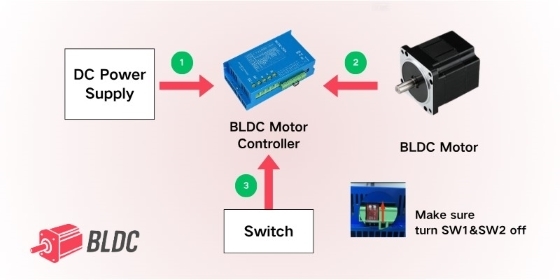
Follow these steps to assemble the circuit.
Step 1: Connect the Power Supply
Connect the 24V DC power supply to the controller's DC input terminals. Make sure the power supply is disconnected while making wiring changes.
Step 2: Connect the Motor
Connect the motor's three phase wires, labeled U, V, and W, to the corresponding terminals on the BLDC controller.
If the motor has built-in Hall sensors, connect the Hall sensor wires to the appropriate terminals on the controller. These signals support accurate motor commutation.
Step 3: Connect the Rocker Switch
Wire the rocker switch to the controller's designated terminals. In this setup, COM is connected through the switch to X1 (EN) and X2 (F/R), which are used for motor enable and direction control.
Follow the controller's wiring diagram to ensure each terminal is connected correctly.
Step 4: Configure the Controller
When using the controller's internal RV potentiometer for speed adjustment, make sure SW1 and SW2 are set to OFF before powering on the circuit.
Refer to the relevant controller documentation before powering on the circuit to confirm the correct switch settings and terminal connections.
How to Verify the Circuit
After completing the wiring, use a multimeter to check the rocker switch connections and make sure the circuit is connected correctly according to the controller wiring diagram.
Before powering on the system, verify that each switch position provides the expected connection between COM, X1 (EN), and X2 (F/R). The switch functions can be confirmed as shown in the summary table below.
| Switch Position | Connection / Function | Motor State |
| Position II | COM connects to X1 (EN) | Enabled; default forward direction |
| Position O | Switch terminals disconnected | Off |
| Position I | COM connects to X2 (F/R) | Reverse direction when enabled |
Note: The exact wiring and switching behavior depend on the controller model. Always follow the manufacturer's wiring diagram and operating instructions.
Testing the Motor and Adjusting Speed
Once the circuit has been connected and checked, you can test the motor's operation.
- Move the rocker switch to Position II to enable the motor and run it in the default forward direction.
- Turn the built-in RV potentiometer clockwise to increase motor speed.
- Turn the potentiometer counterclockwise to reduce speed until the motor stops.
- Move the rocker switch to Position O to stop the motor.
- Move the switch to Position I to select reverse operation. The RV potentiometer can still be used to adjust speed in this direction.
The switch provides straightforward control of motor operation, while the analog RV input allows speed to be adjusted without changing the wiring.
Conclusion
The I/O+RV control method offers a practical way to operate a brushless DC motor using a rocker switch and a built-in analog speed control. The switch manages motor enable and direction, while the RV potentiometer provides continuous speed adjustment.
By selecting compatible components, following the controller's wiring diagram, and verifying the connections before operation, users can build a BLDC electric motor control circuit suited to a range of applications.
If you are preparing a similar setup, visit BLDC.com to explore BLDC motors and controllers for your project.


