
Brushless DC (BLDC) motors are celebrated for their high efficiency, exceptional reliability, and long operating lifespan. However, getting the most out of them requires mastering how you control their speed.
While PWM (Pulse Width Modulation) and digital communication protocols are popular, using a 0-5V analog voltage input remains one of the simplest, most intuitive, and most robust ways to achieve precise, variable speed control—ideal for everything from industrial automation jigs to custom DIY robotics.
In this article, we’ll break down the hardware you need, how to configure your DIP switches, correct wiring for forward and reverse rotation, and how to test the system safely.
Required Components
Before getting your hands dirty with wiring, make sure your workbench is stocked with the following components:
- BLDC Motor: The brushless DC motor you intend to control.
- Compatible Motor Controller: Ensure your controller supports analog 0–5V external input.
- DC Power Supply: Sized appropriately for your BLDC motor's voltage and current ratings.
- Control Box / Enclosure: To house your switches and connections safely.
- 0-5V Signal Generator (or Potentiometer setup): To provide the variable analog voltage control signal.
- Basic Wiring & Connectors: For motor phase wires, Hall sensors, and control lines.
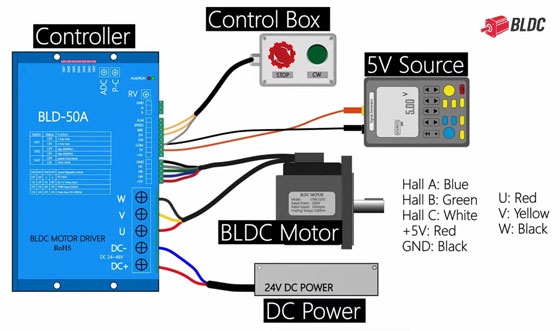
Step 1: Basic Wiring & Hall Sensor Setup
Before altering control modes, you need to establish the foundational wiring between your BLDC motor and the controller.
- Power & Phase Wires: Connect your motor’s phase wires securely to the controller's output terminals.
- Hall Sensor Feedback: Connect the Hall sensor wires (typically providing rotor position feedback) as referenced in standard BLDC wiring diagrams.
Safety Tip: Always double-check your connections with the power turned OFF to prevent short circuits or damaging the motor controller's internal inverter stage.
Step 2: Configuring the DIP Switches
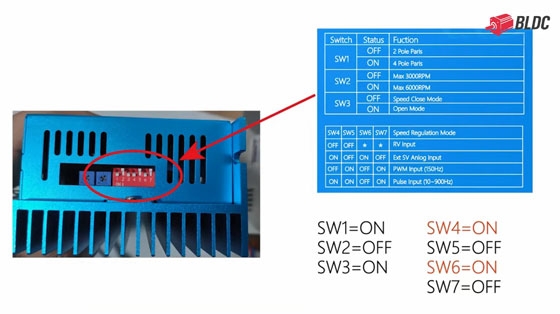
Unlike digital or preset speed modes, analog voltage control requires specific configuration on the controller's DIP switch block.
- Locate the DIP switches on your controller.
- Change Switch 4 and Switch 6 from the OFF position to the ON position.
Note: Always consult your specific controller's datasheet, as switch numbering and functions can occasionally vary by manufacturer.
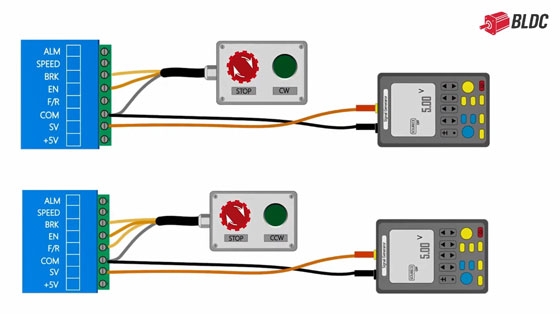
Step 3: Wiring the 0-5V Signal Generator
Connecting your analog source is straightforward, but you must pay close attention to terminal labels to choose your direction.
- Terminals: Connect the output of your 5V signal generator to the SV (Speed Voltage) and COM (Common/Ground) terminals on the controller.
- Direction Control: The upper circuit configuration diagram in your manual typically handles forward rotation. The lower circuit configuration diagram is intended for reverse rotation.
Step 4: Power-Up and Testing
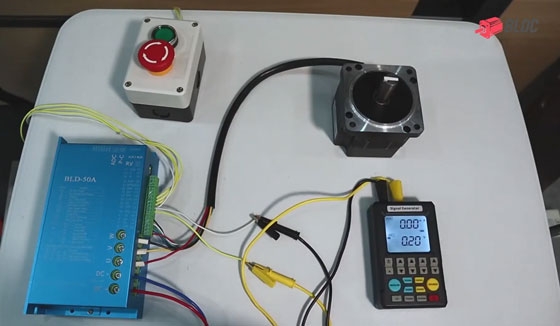
With your hardware mounted, switches configured, and signal generator wired, you are ready to test the brushless DC motor.
Power on the main DC power supply, press the start button on the control box, and turn on the 5V signal generator. As you slowly turn up the output voltage, you will notice the motor speed increases smoothly in direct proportion to the input signal; conversely, gradually reducing the voltage causes the motor to decelerate proportionally until it comes to a complete stop at 0V.
Why Choose a 0-5V Analog Input?
- Simplicity: No programming or microcontrollers (like Arduino or ESP32) are strictly required if you are using a manual signal generator or potentiometer.
- Smooth Linear Control: Analog voltage provides infinitely variable speed resolution limited only by your signal source's precision.
- Industry Standard: 0-5V and 0-10V signals are widely compatible across industrial instrumentation and PLC analog output modules.
For a visual demonstration of the wiring and live testing steps, check out the video guide: BLDC Motor Speed Control with 0-5V Analog Voltage Input.


